- NUCLEO-L476RG board
- LoRa® module

Nous sommes ravis de vous accueillir 😊, Souhaitez-vous recevoir la newsletter mensuelle de Vittascience pour rester informé(e) des nouveautés, événements et contenus pédagogiques ?
Pour finaliser votre inscription, veuillez compléter les champs suivants :
Vittascience place la sécurité et la confidentialité des données personnelles de ses utilisateurs au cœur de ses préoccupations. Découvrez notre politique de protection des données personnelles.

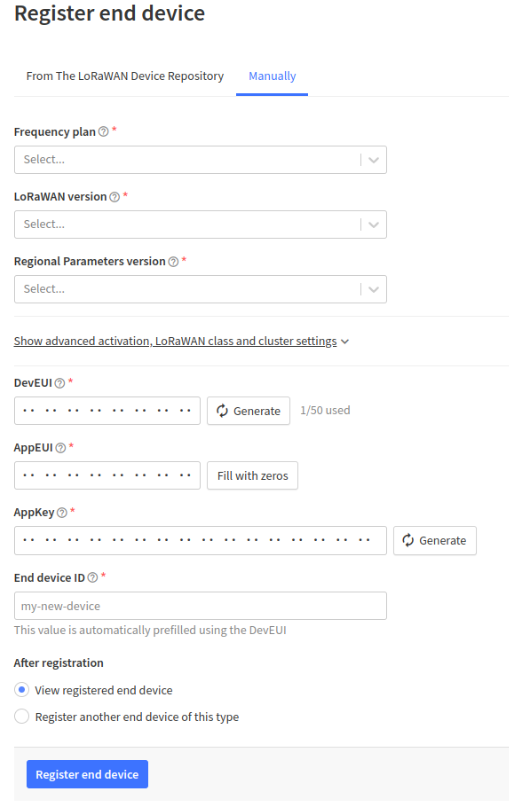
The goal of this tutorial is to connect a LoRa module to The Things Network, also known as TTN.
Step 1 : Connect the LoRa-E5 module directly to the "UART" slot.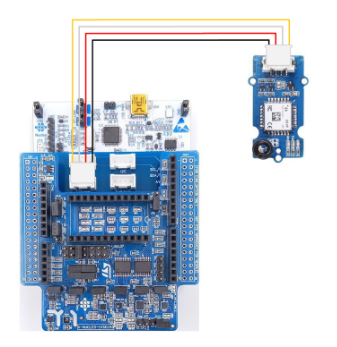
Step 2 : Go to https://fr.vittascience.com/l476/
Step 3 : Pick the initialisation block of the LoRa module from the Communication category and drop it in the blockly workspace.
Step 4 : Connect the board to your computer and click on the upload button.
Step 5 : Once the upload is finished , the program will start and you will see lots of information about your module in the console.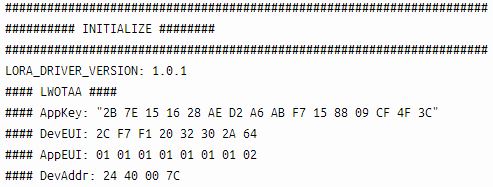
Keep it in mind you will need it when adding your module to the application.

Copyright © 2026 Vittascience